WhatsApp, the famous chat app, has announced a new application for importing animated sticker sets, available in the next 24 hours.
To start, users must upgrade WhatsApp to take advantage of the animated sticker pack import feature. Then they should have one of the several “sticker builder” applications available on the Google Play Store or the Apple App Store.
This news was confirmed by WABetaInfo, who announced it on Twitter: “I’m excited to share that WhatsApp is announcing the ability to import animated sticker packs for ALL iOS and Android users WORLDWIDE TODAY! Within 24 hours, the feature will be available on your WhatsApp edition. Enjoy submitting your animated stickers, and follow the instructions in the article.
This functionality has been available for a while on iOS and Android. WhatsApp now allows users to import animated images as sticker packs (via a compatible app) into the app, similar to how users can still import static image sticker packs.
What are Animated Sticker Packs in WhatsApp?
Animated sticker packs are a bundle of several animated stickers in the form of a single package. Each sticker remains playable for a couple of seconds and runs in a smooth cycle. Animated stickers were introduced by WhatsApp to create a better user interface and better app performance.
Unlike GIF, animated stickers utilise the WebP animation format, which requires less data and hence works faster. With this, WhatsApp has been successful in striking a perfect balance between creativity and efficiency, as seen in various regions where there are differing bandwidth capacities.
Animated stickers are seen with regular stickers in the sticker tray, which makes it easy to use them. Once an animated sticker has been downloaded, it remains available offline, which makes it better than searching online for GIFs.
How Animated Stickers Work Technically
Animated stickers rely on the WebP animation format, which supports transparency and smooth motion at small file sizes. WhatsApp limits sticker size and duration to ensure consistent performance across devices.
Each animated sticker pack contains metadata, preview images, and animation frames. When imported, WhatsApp stores these files locally, allowing offline usage. This design prevents repeated downloads and reduces data consumption during chats.
Because WhatsApp enforces strict format rules, not all animated images qualify as stickers without conversion.
How to Create an Animated Sticker Pack on WhatsApp
Go to the most popular website Giphy, and this platform allows users to create and download their GIFs.
Click on the Sticker Tab on Home Page.
Search for moving images without the Background images, and download the one that fits your mood.
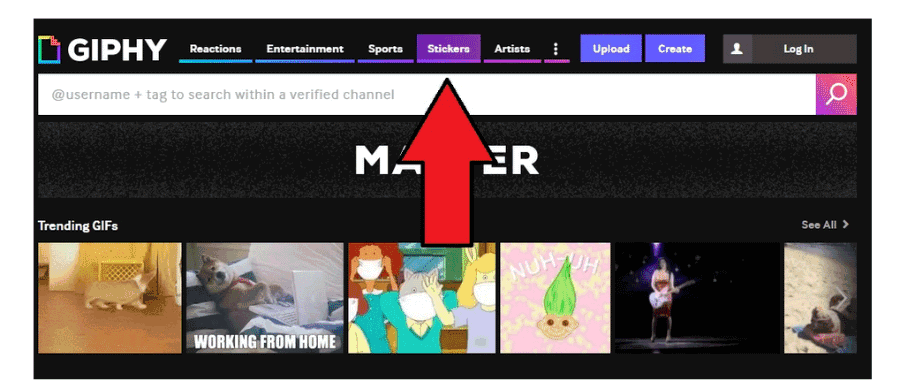
The sticker, which you choose, will be downloaded in GIF format. But here is the trick, it won’t work on WhatsApp.
It would be best to change the GIF extension to WEBP, and here is the link to convert. Also, remember to keep 512 x 512 pixels before uploading the file.
Add the files to WhatsApp –> Sticker folder, and that’s it. To get to this file, go to WhatsApp –> Media and then –> WhatsApp Sticker. You can now share it with your friends quickly and easily.
Common Issues While Importing Animated Stickers
Users sometimes face problems when importing animated sticker packs. Common issues include packs not appearing, animations failing to play, or stickers loading slowly.
These problems often stem from outdated WhatsApp versions, unsupported sticker formats, or corrupted cache data. Updating WhatsApp and restarting the device usually resolves most issues. Clearing the cache from device settings also helps in some cases.
Using multiple sticker apps simultaneously may create conflicts, so limiting active sticker apps improves stability.