Your old likes on Twitter can quietly influence how people perceive you. A single click from the past can come back to haunt you. Many people find that their former behaviour is no longer representative of their current interests. However, deleting hundreds or thousands of likes manually is exhausting.
You may look into mass deletion tools, but a single mistake can lock down your account. Twitter’s algorithms are designed to watch for unusual patterns of behaviour, and a sudden spurt of mass deletions can cause problems. Is there a way to clean up your act without losing your account?
In this blog post, we’ll explore methods for deleting your Twitter likes in bulk without getting banned, giving you control over your online presence.
Why Mass Delete Twitter Likes?
Maybe you liked too many tweets and can’t seem to get rid of them. Maybe you want to erase a large number of Twitter likes at once. You may erase past likes if you no longer want to be associated with that account, subject, person, or concept. Using a service that instantly erases your Twitter likes can be useful in these situations.
You may also dislike likes directly from Twitter, but you would need to delete each tweet one by one. You may dislike the Twitter platform if you merely want to eliminate recent Twitter likes. On the other hand, a third-party tool can save you time and effort if you want to dislike many Twitter postings.
In any case, undoing a Twitter “like” is a common option. It’s quick and simple, and many others have already done it. But what if you want to start over and remove all of your likes?
Let’s get started! There are a couple of ways to eliminate your Twitter “likes,” so let’s get started! The only native-to-Twitter solution is to remove your likes one at a time from your phone, laptop, PC, or tablet using the Twitter app. While the procedure appears simple and basic, it is actually rather time-consuming and tiresome. Manual deletion has the advantage of allowing you to save certain likes if desired. This is how you do it:
Delete Twitter Likes in Bulk With Circleboom
Circleboom Twitter is a comprehensive Twitter management tool that you can use to delete all your Twitter likes in bulk. You can select all or some of your Twitter favourites or likes and delete them quickly and safely on Circleboom.
To use Circleboom Twitter to delete all your likes on Twitter, you should follow these steps;
Log in to Circleboom Twitter.
If you don’t have a Circleboom account yet, you can get one quickly with a few clicks.

After you sign in, continue and quickly connect your Twitter account to Circleboom’s dashboard.
It’ll be done in seconds!

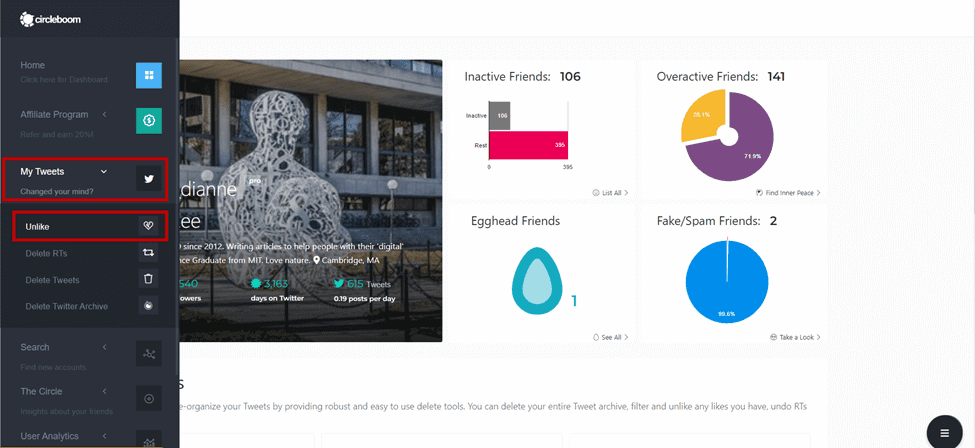
Open the left-hand menu and click “My Tweets.”
Once you click it, a dropdown menu will open. Select “Unlike” to delete your favourites on Twitter.
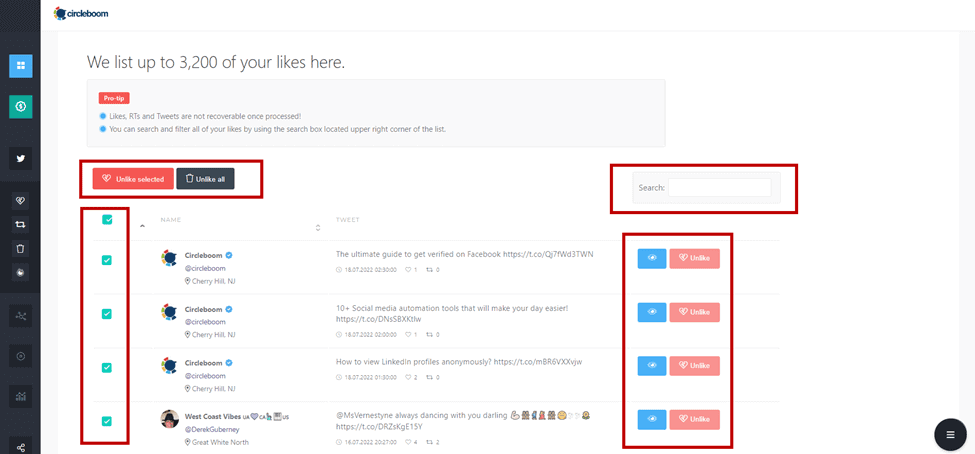
On the Unlike Tweets board, the “Unlike All” button is located at the top of the list. You can click on it to delete all your Twitter likes in one go. Or, you can choose your Twitter likes selectively and delete them all via the red “Unlike Selected” button.
Further, you can use the search box and look for your specific Twitter likes via searching keywords, hashtags, or usernames.
You don’t have to be concerned about your security while using Circleboom. Unlike most other software available on the internet, Circleboom requires authorisation. Circleboom Twitter will also give you amazing follower/following information, tweet data, access to find inactive, overactive, fake, spammy, egghead followers and delete them, best time to tweet, hashtag, keyword search on Twitter, and much more.
As an all-in-one Twitter management tool, you can also delete all your tweets, retweets, replies, mentions, media, and your Twitter archive with Circleboom. Thanks to its iOS app, you can take Circleboom wherever you are and clean up and manage your Twitter account.
Using TweetEraser Tool
TweetEraser is a third-party Twitter management tool that allows users to delete their tweets and likes in bulk. It is a popular and reliable tool that provides users with several features and options to manage their Twitter accounts. With TweetEraser, users can select specific tweets or delete them all at once. The tool supports several filtering options, allowing users to filter their tweets or likes based on keywords, date range, media type, or location. This makes it easier for users to find and delete specific content they no longer want to keep on their Twitter accounts.
TweetEraser also offers a free version with limited features, allowing users to delete up to 3,200 tweets and 100 likes. The paid versions offer more advanced features and higher deletion limits, allowing users to manage their Twitter accounts more effectively. The tool is user-friendly, and the interface is straightforward and easy to navigate, making it accessible to users of all skill levels.
The security features of TweetEraser are one of its distinguishing qualities. The tool makes use of the OAuth authentication protocol to guarantee the security of users’ Twitter login information. To further protect user privacy and security, TweetEraser does not keep any user information or account data.
Also Read: How to export Twitter Followers in Excel?
TwitWipe Tool
TwitWipe is a strong tool for cleaning up your Twitter account that lets you delete all of your tweets and likes at once. With TwitWipe, you don’t have to delete all your old tweets one by one to start over on Twitter. In this TwitWipe description that is better for SEO, we’ll go into more detail about its benefits and features.
First of all, TwitWipe is a very easy tool to use. Sign in with your Twitter account, choose whether you want to delete your tweets or likes, and click the “Wipe” button. The rest will be taken care of by TwitWipe, which will delete all your tweets or likes in just a few minutes.
Another great thing about TwitWipe is that you can use it for free. Unlike many other tools for cleaning up Twitter, there are no secret costs or subscriptions. You don’t even have to sign up for an account to use TwitWipe. TwitWipe is also very fast and good at what it does. It can delete thousands of tweets or likes in just a few minutes, so you won’t have to spend hours removing old content by hand. This makes it a good choice for people who want to start over quickly on Twitter.
Also read: The 5 Best Twitter Marketing Tools in 2023
Deleting Likes Manually
This may take some time, but it is the most effective method for removing certain likes. You don’t have to worry about it depleting your bank account since it’s free.
Simply go to your timeline and manually choose the tweets from which you want to delete the likes. Customised applications have API limitations that prevent them from displaying your actual Twitter feed. This strategy is best when you want to ensure that the most likes are removed from your timeline. Because all of the programs for doing this have their own set of restrictions, the manual way is regarded as the best.
Remember that the techniques listed above are irreplaceable, and once used, you cannot restore the erased likes on Twitter.
Conclusion
Finally, you know how to delete Twitter likes in bulk. Mass deleting Twitter likes keeps your profile tidy and organised. It also gives you a fresh start to building your Twitter following. There are many ways to delete Twitter likes in bulk, but I guess for most users, the third-party tool Circlebloom might be handy and time-saving. If not, there are free options also. To get started, follow the steps of the method outlined in this article.